

We’ve all been there: you ask an AI like Claude a question about your business, only to get the same frustrating reply: “I can’t access that information.” The irony is that while these models know most about the public internet, they’re completely blind to your company’s own data.
This isn’t just a personal annoyance. One company learned it the hard way, investing months of time, effort, and manpower into an AI software that couldn’t answer basic internal questions, all because it was disconnected from their proprietary data.
This raises two crucial questions: What could they have done differently, and what can we do to avoid the same trap today?
Well, the simple answer is MCP Express. Let me explain it to you.
1. Real Experience Before and After MCP Express
Let me share what happened last Tuesday at a startup. Their engineer was pasting CloudWatch logs into Claude:
Engineer: “What’s causing these 500 errors?”
Claude: “I can see timeout errors, but without database or server access, I can’t find the root cause.”
Sound familiar? Their AI could analyze logs but couldn’t check database connections or restart services. The engineer sighed: “I wish Claude could just fix this.”
Ten minutes later, he connected MCP Express to their PostgreSQL, CloudWatch, and SSH. Two minutes after that:
Engineer: “Claude, check the database pool, review error logs, and restart payment services 3-5 if they’re down.”
Claude did exactly that.
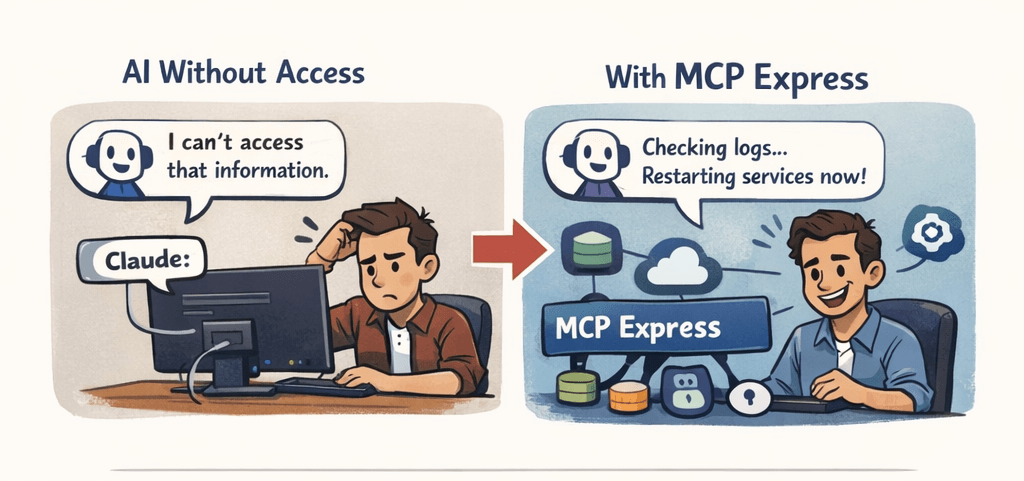
That moment when AI transitions from consultant to colleague who can actually act is MCP Express. It’s not just improvement; it’s transformation.
2. What Exactly is MCP Express? (The Simple Version)
Think of MCP Express as “USB-C for AI.”
Remember when every phone had a different charger? USB-C changed that: one standard connector that works with everything.
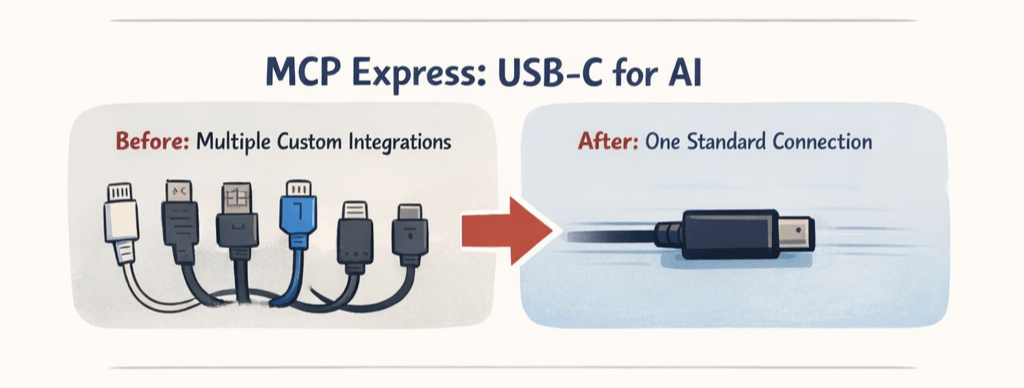
MCP Express does the same for AI:
- Before: Every AI application needs custom integrations to talk to your systems
- After: One standardized connection works with any AI tool
But here’s the best part: you don’t need to be an MCP expert to use it. MCP Express gives you a simple interface where you:
- Pick what you want to connect (Database, API, SSH, etc.)
- Define what tools you want to expose
- Deploy with one click
- Connect to MCP-compatible AIs like Claude, GitHub Copilot, etc.
The technical term is “MCP Server,” but you can think of it as your AI’s personalized access pass to your business.
3. MCP Express Explained: The 3 Pieces That Make It Work
Think of MCP Express as building a secure embassy for your AI. Here’s what that embassy looks like:
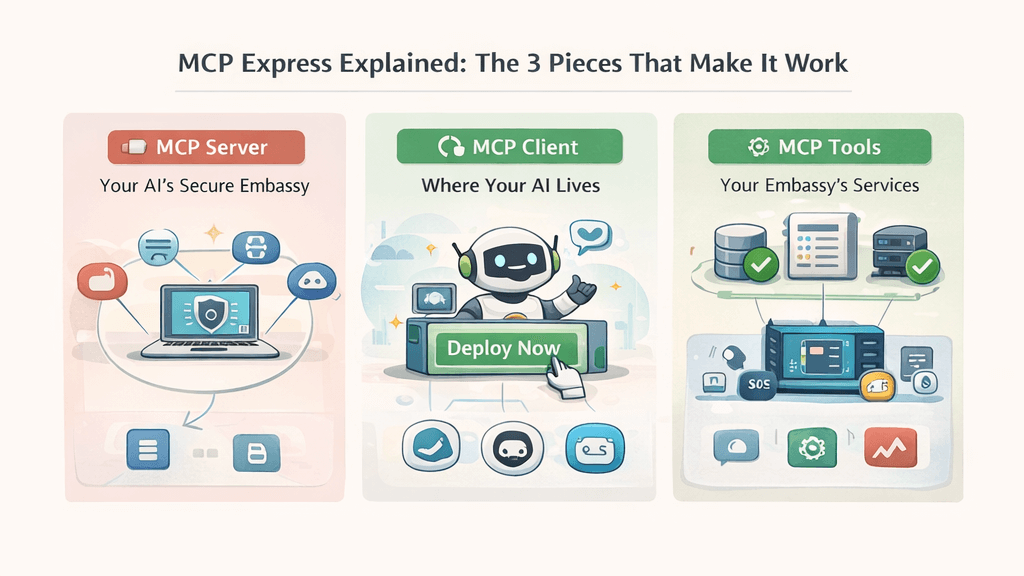 MCP Server: Your AI’s Secure Embassy
This is the heart of it all. An MCP server is like establishing an official embassy that represents your business in “AI Land.” It’s a secure, controlled environment where:
- Your business rules are the law
- Only approved interactions happen
- Everything gets logged and monitored
With MCP Express, you’re not building this embassy from scratch. You’re configuring it in minutes—choosing which rooms to include, setting security protocols, and opening for business.
MCP Client: Where Your AI Lives
These are the applications your team already uses: Claude Desktop, GitHub Copilot, and more. Think of them as tourists visiting your embassy.
The beautiful part? You build one embassy (MCP Server) that can serve all tourists (any MCP Client). Today it’s Claude; tomorrow it’s whatever new AI tool your team adopts.
MCP Tools: Your Embassy’s Services
This is where the magic happens. Each tool is a specific service your embassy offers:
|
Tool Type |
Like Embassy Offering |
Real Example |
|---|---|---|
|
Database Tools |
Library access |
“Show me Q3 sales data.” |
|
SSH Executor |
Controlled vehicle access |
“Restart the staging server.” |
|
API Connectors |
Communication services |
“Check Stripe for failed payments.” |
| AWS Cloudwatch |
Security camera feed |
“What errors happened last hour?” |
The key? You control exactly which tools are available and how they can be used.
4. Here’s What You Can Actually Build (No PhD Required)
Database Superpowers
Before: “I need to write SQL, run it, copy the results, paste them into Claude, then ask for analysis.”
After: “Claude, what were our top 5 products by revenue last quarter, broken down by region?”
Tools that make it happen:
- PostgreSQL/MySQL/MSSQL: Real-time querying
- DynamoDB: NoSQL made accessible
- REST API Calls: Connect to any service
DevOps on Autopilot
Before: Getting paged at 2 AM, SSHing into servers, checking logs manually
After: “Claude, check the error rate on the API gateway and restart the affected services if it’s above 5%.”
Tools that make it happen:
- SSH Command Executor: Safe, controlled server access
- CloudWatch: Real-time log analysis
- S3 Client: Check deployment artifacts, read configuration files
Company Knowledge That Actually Gets Used
Before: New hires spend weeks “learning the ropes” and tribal knowledge
After: “Claude, what’s our deployment process for mobile apps, and show me the recent checklist updates.”
Tools that make it happen:
- Confluence: Instant access to documentation
5. The “But Is This Safe?” Question (And Why It’s Actually Better)
I know what you’re thinking: “You want me to give AI SSH access to my servers?”
Actually, no. And this is the beautiful part.
Traditional approach: Give someone (or something) credentials → Hope they use them responsibly
MCP Express approach: Define exactly what actions are allowed → Enforce those boundaries
Here are the dos and don’ts.
What You Don’t Do:
Give AI: Full Credential & Capabilities (Unchecked Power)
What You Do in MCP Express:
Give AI: Limited Credential & Limited Capabilities
It’s more secure than most human access because:
- Every action is logged (unlike Steve from DevOps, who never documents his quick fixes)
- Inputs are validated
- Rate limits prevent abuse
- You audit what tools exist (unlike random API keys floating around Slack)
The security team at a fintech company using MCP Express told me, “We have better visibility into what our AI is doing than what half our engineers are doing.”
6. Real Stories from Real Teams (Not Hypotheticals)
The Startup That Shipped AI Features in a Week
A 10-person SaaS company wanted to add “Ask about your data” to their product. Their estimate: 3 months of engineering time.
With MCP Express, they:
- Connected their PostgreSQL database (2 minutes)
- Exposed read-only query tools (5 minutes)
- Built a simple frontend (3 days)
- Shipped to customers (1 week total)
Their CEO’s quote: “We looked like a company 10x our size. Our competitors are still trying to figure out how we did it.”
The Support Team That Reduced Tickets by 40%
A 50-person e-commerce company was overwhelmed with “Where’s my order?” questions.
With MCP Express, they built an AI that:
- Checks order status in their database
- Pulls shipping info from ShipStation’s API
- Reads return policy from their Confluence
- Can even initiate returns (within rules)
Result: 40% fewer support tickets, and the ones that come through are already half-solved.
The Solo Developer Building a Side Project
One developer, nights and weekends, building an AI-powered personal finance app.
With MCP Express, they:
- Connected to Plaid’s API (bank data)
- Set up PostgreSQL for transaction storage
- Added analysis tools
- Deployed to production (all by themselves)
Their take: “I’m competing with funded startups, and I’m moving faster because I’m not building integration plumbing.”
7. Your 5 Minutes with MCP Express (Seriously, Try It)
Since you’ve come this far, you’re probably fascinated, right? Makes sense. Now, how about you see this in action yourself?
Here’s what you have to do:
Step 1: Sign up at mcp-express.com. (It’s free to start, literally no hidden cost)
Step 2: Create your first MCP server.
Step 3: Add a MySQL tool and connect to your database. (You can try it with XAMPP if you’re nervous.)
Step 4: Connect with Claude Desktop.
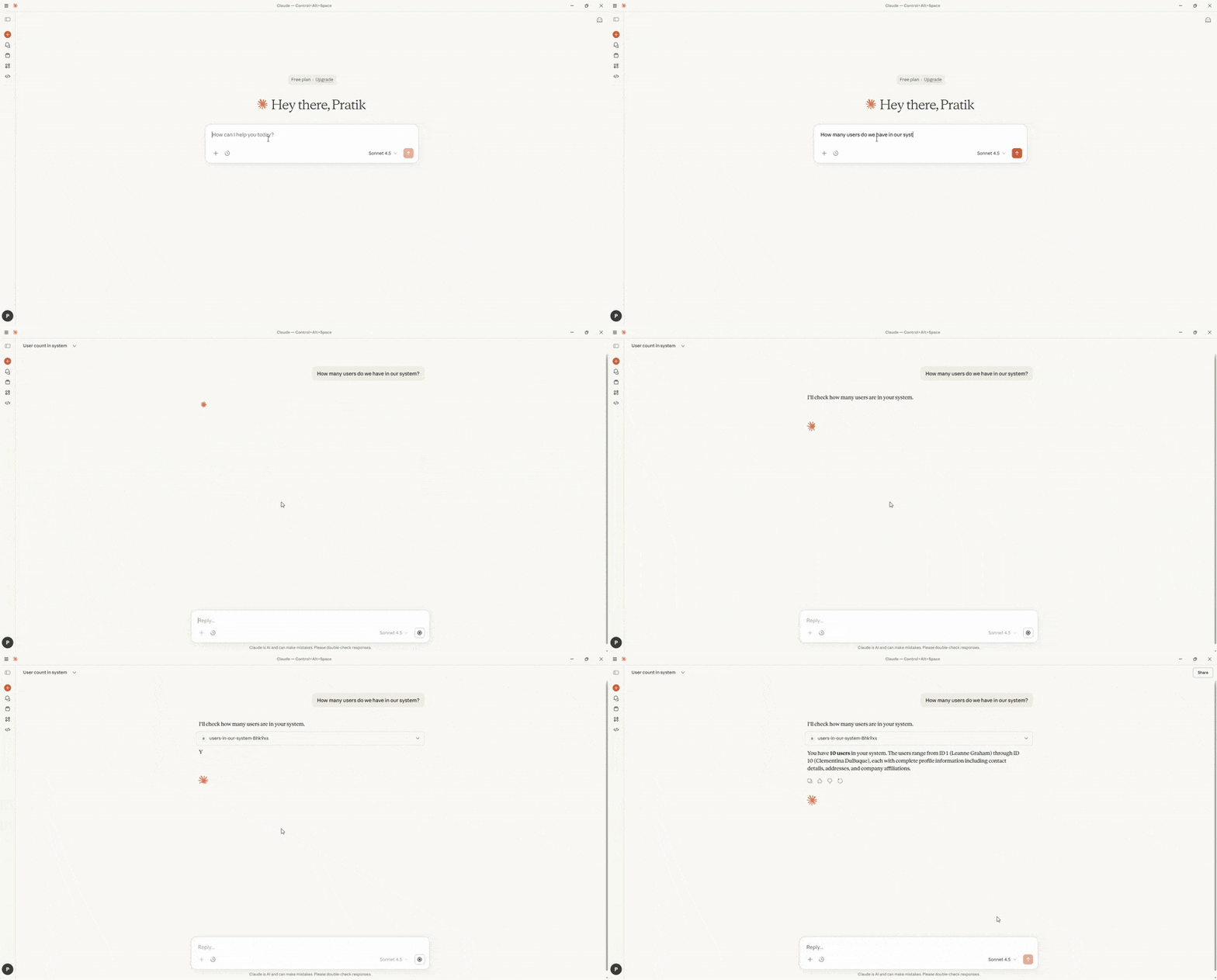
Step 5: Ask Claude, “How many users do we have in our system?”
Here’s how Claude responds:
8. What Most Companies Miss
Most teams think AI transformation means:
- Buying better AI Models
- Hiring AI Experts
- Building fancy Interfaces
They’re missing out on step 0: Connecting AI to their actual business.
While others are waiting for AI to magically understand their business, take a bigger step and connect within minutes.
9. What Happens Next Is Up to You
I’ll leave you with this thought:
The most valuable AI in the world isn’t the one with the highest IQ. It’s the one that knows your customers, your data, and your business processes.
MCP Express is how you build that AI.
Your first connection is waiting. It takes 5 minutes. It’s free to start. And it might just change how you think about what’s possible with AI.
Ready to see what your AI can do when it finally understands your business?
 Nov 24, 2025